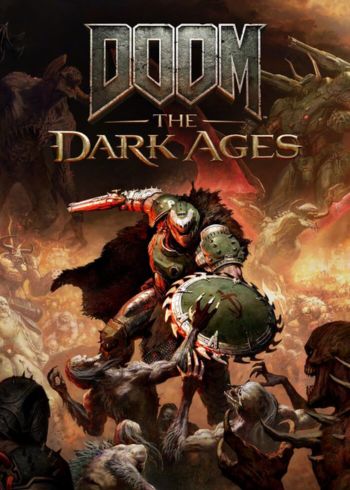

DOOM: The Dark Ages is the brutal prequel to DOOM (2016) and DOOM Eternal, plunging players into a dark medieval war against Hell. Step into the role of the DOOM Slayer and unleash devastating weapons like the Super Shotgun and the all-new Shield Saw. Experience intense, grounded combat in a single-player campaign packed with cinematic storytelling, legendary battles, and the raw power of the idTech engine.
Explore vast, demon-infested worlds—from ruined castles to ancient hellscapes—designed as the most expansive levels in the franchise’s history. With dark fantasy visuals, relentless action, and a mythic origin story, DOOM: The Dark Ages delivers the next evolution of the iconic DOOM experience. Fight Hell. Become the Slayer.
Requires a 64-bit processor and operating system
OS: Windows 10 64-Bit / Windows 11 64-Bit
Processor: AMD Zen 2 or Intel 10th Generation CPU @3.2Ghz with 8 cores / 16 threads or better (examples: AMD Ryzen 7 3700X or better, or Intel Core i7 10700K or better)
Memory: 16 GB RAM
Graphics: NVIDIA or AMD hardware Raytracing-capable GPU with 8GB dedicated VRAM or better (examples: NVIDIA RTX 2060 SUPER or better, AMD RX 6600 or better)
Storage: 100 GB available space
Additional Notes: 1080p / 60 FPS / Low Quality Settings, NVME SSD storage required
Requires a 64-bit processor and operating system
OS: Windows 10 64-Bit / Windows 11 64-Bit
Processor: AMD Zen 3 or Intel 12th Generation CPU @3.2Ghz with 8 cores / 16 threads or better (examples: AMD Ryzen 7 5700X or better, or Intel Core i7 12700K or better)
Memory: 32 GB RAM
Graphics: NVIDIA or AMD hardware Raytracing-capable GPU with 10GB dedicated VRAM or better (examples: NVIDIA RTX 3080 or better, AMD RX 6800 or better)
Storage: 100 GB available space
Additional Notes: 1440p / 60 FPS / High Quality Settings, NVME SSD storage required
Please follow these instructions to activate a new retail purchase on Steam:
1. Launch the Steam client software and log into your Steam account.
2. Click the Games Menu.
3. Choose Activate a Product on Steam...
4. Follow the onscreen instructions to complete the process.

DOOM: The Dark Ages is the brutal prequel to DOOM (2016) and DOOM Eternal, plunging players into a dark medieval war against Hell. Step into the role of the DOOM Slayer and unleash devastating weapons like the Super Shotgun and the all-new Shield Saw. Experience intense, grounded combat in a single-player campaign packed with cinematic storytelling, legendary battles, and the raw power of the idTech engine.
Explore vast, demon-infested worlds—from ruined castles to ancient hellscapes—designed as the most expansive levels in the franchise’s history. With dark fantasy visuals, relentless action, and a mythic origin story, DOOM: The Dark Ages delivers the next evolution of the iconic DOOM experience. Fight Hell. Become the Slayer.
Requires a 64-bit processor and operating system
OS: Windows 10 64-Bit / Windows 11 64-Bit
Processor: AMD Zen 2 or Intel 10th Generation CPU @3.2Ghz with 8 cores / 16 threads or better (examples: AMD Ryzen 7 3700X or better, or Intel Core i7 10700K or better)
Memory: 16 GB RAM
Graphics: NVIDIA or AMD hardware Raytracing-capable GPU with 8GB dedicated VRAM or better (examples: NVIDIA RTX 2060 SUPER or better, AMD RX 6600 or better)
Storage: 100 GB available space
Additional Notes: 1080p / 60 FPS / Low Quality Settings, NVME SSD storage required
Requires a 64-bit processor and operating system
OS: Windows 10 64-Bit / Windows 11 64-Bit
Processor: AMD Zen 3 or Intel 12th Generation CPU @3.2Ghz with 8 cores / 16 threads or better (examples: AMD Ryzen 7 5700X or better, or Intel Core i7 12700K or better)
Memory: 32 GB RAM
Graphics: NVIDIA or AMD hardware Raytracing-capable GPU with 10GB dedicated VRAM or better (examples: NVIDIA RTX 3080 or better, AMD RX 6800 or better)
Storage: 100 GB available space
Additional Notes: 1440p / 60 FPS / High Quality Settings, NVME SSD storage required
Please follow these instructions to activate a new retail purchase on Steam:
1. Launch the Steam client software and log into your Steam account.
2. Click the Games Menu.
3. Choose Activate a Product on Steam...
4. Follow the onscreen instructions to complete the process.
DOOM: The Dark Ages is the brutal prequel to DOOM (2016) and DOOM Eternal, plunging players into a dark medieval war against Hell. Step into the role of the DOOM Slayer and unleash devastating weapons like the Super Shotgun and the all-new Shield Saw. Experience intense, grounded combat in a single-player campaign packed with cinematic storytelling, legendary battles, and the raw power of the idTech engine.
Explore vast, demon-infested worlds—from ruined castles to ancient hellscapes—designed as the most expansive levels in the franchise’s history. With dark fantasy visuals, relentless action, and a mythic origin story, DOOM: The Dark Ages delivers the next evolution of the iconic DOOM experience. Fight Hell. Become the Slayer.
Requires a 64-bit processor and operating system
OS: Windows 10 64-Bit / Windows 11 64-Bit
Processor: AMD Zen 2 or Intel 10th Generation CPU @3.2Ghz with 8 cores / 16 threads or better (examples: AMD Ryzen 7 3700X or better, or Intel Core i7 10700K or better)
Memory: 16 GB RAM
Graphics: NVIDIA or AMD hardware Raytracing-capable GPU with 8GB dedicated VRAM or better (examples: NVIDIA RTX 2060 SUPER or better, AMD RX 6600 or better)
Storage: 100 GB available space
Additional Notes: 1080p / 60 FPS / Low Quality Settings, NVME SSD storage required
Requires a 64-bit processor and operating system
OS: Windows 10 64-Bit / Windows 11 64-Bit
Processor: AMD Zen 3 or Intel 12th Generation CPU @3.2Ghz with 8 cores / 16 threads or better (examples: AMD Ryzen 7 5700X or better, or Intel Core i7 12700K or better)
Memory: 32 GB RAM
Graphics: NVIDIA or AMD hardware Raytracing-capable GPU with 10GB dedicated VRAM or better (examples: NVIDIA RTX 3080 or better, AMD RX 6800 or better)
Storage: 100 GB available space
Additional Notes: 1440p / 60 FPS / High Quality Settings, NVME SSD storage required
Please follow these instructions to activate a new retail purchase on Steam:
1. Launch the Steam client software and log into your Steam account.
2. Click the Games Menu.
3. Choose Activate a Product on Steam...
4. Follow the onscreen instructions to complete the process.