GOAT Simulator GoatZ DLC

GOAT Simulator GoatZ DLC

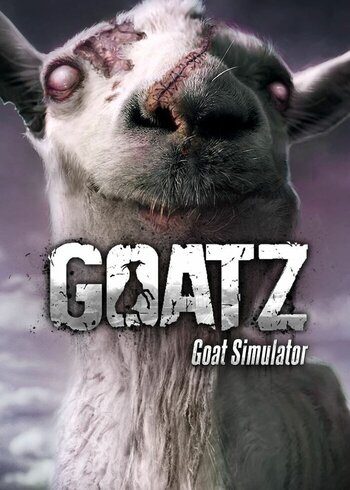
Goat Simulator GoatZ (DLC) Cover
Set Lowest Price Alert
×
Notify me, when price drops
Set Alert for Product: Goat Simulator: GoatZ - $0.99

PLATFORM

PC Steam

REGION

Region Free

GAME INFO

RELEASE DATE:

May 7, 2015

DEVELOPER:

Coffee Stain Studios

PUBLISHER:

Coffee Stain Studios

GENRE:

Indie, Simulation

FOR AGES:

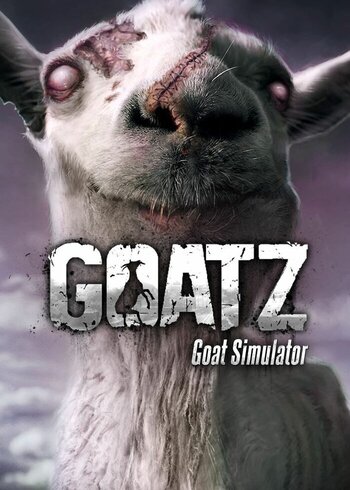
Goat Simulator GoatZ (DLC) Cover

PLATFORM

PC Steam

REGION

Region Free
Set Lowest Price Alert
×
Notify me, when price drops
Set Alert for Product: Goat Simulator: GoatZ - $0.99

GAME INFO

RELEASE DATE:

May 7, 2015

DEVELOPER:

Coffee Stain Studios

PUBLISHER:

Coffee Stain Studios

GENRE:

Indie, Simulation

FOR AGES:

  • INFORMATION
  • SYSTEM REQUIREMENTS
  • KEY ACTIVATION

GOAT Simulator GoatZ

You no longer have to fantasize about being a zombie goat in the middle of a zombie apocalypse, your dreams have finally come true!

  •  

MINIMUM:

    • OS: Windows Vista
    • Processor: 2.0 GHz Dual Core Processor
    • Memory: 2 GB RAM
    • Graphics: Shader Model 3.0, 256 MB VRAM
    • DirectX: Version 9.0c
    • Storage: 2 GB available space
    • Sound Card: DirectX 9.0c-compatible, 16-bit


RECOMMENDED:

    • OS: Windows 7 or 8
    • Processor: 2.0 GHz Quad Core Processor
    • Memory: 4 GB RAM
    • Graphics: Shader Model 3.0, 512 MB VRAM
    • DirectX: Version 9.0c
    • Storage: 2 GB available space
    • Sound Card: DirectX 9.0c-compatible, 16-bit

Activating a CD Key on Steam

Please follow these instructions to activate a new retail purchase on Steam:

1. Launch the Steam client software and log into your Steam account.

2. Click the Games Menu.

3. Choose Activate a Product on Steam...

4. Follow the onscreen instructions to complete the process.

Goat Simulator GoatZ (DLC) Cover

TYPE

DLC

PLATFORM

PC Steam

REGION

Region Free
Set Lowest Price Alert
×
Notify me, when price drops
Set Alert for Product: Goat Simulator: GoatZ - $0.99

GAME INFO

RELEASE DATE:

May 7, 2015

DEVELOPER:

Coffee Stain Studios

PUBLISHER:

Coffee Stain Studios

GENRE:

Indie, Simulation

FOR AGES:

  • INFORMATION
  • SYSTEM REQUIREMENTS
  • KEY ACTIVATION

GOAT Simulator GoatZ

You no longer have to fantasize about being a zombie goat in the middle of a zombie apocalypse, your dreams have finally come true!

  •  

MINIMUM:

    • OS: Windows Vista
    • Processor: 2.0 GHz Dual Core Processor
    • Memory: 2 GB RAM
    • Graphics: Shader Model 3.0, 256 MB VRAM
    • DirectX: Version 9.0c
    • Storage: 2 GB available space
    • Sound Card: DirectX 9.0c-compatible, 16-bit


RECOMMENDED:

    • OS: Windows 7 or 8
    • Processor: 2.0 GHz Quad Core Processor
    • Memory: 4 GB RAM
    • Graphics: Shader Model 3.0, 512 MB VRAM
    • DirectX: Version 9.0c
    • Storage: 2 GB available space
    • Sound Card: DirectX 9.0c-compatible, 16-bit

Activating a CD Key on Steam

Please follow these instructions to activate a new retail purchase on Steam:

1. Launch the Steam client software and log into your Steam account.

2. Click the Games Menu.

3. Choose Activate a Product on Steam...

4. Follow the onscreen instructions to complete the process.

  • INFORMATION
  • SYSTEM REQUIREMENTS
  • KEY ACTIVATION

GOAT Simulator GoatZ

You no longer have to fantasize about being a zombie goat in the middle of a zombie apocalypse, your dreams have finally come true!

  •  

MINIMUM:

    • OS: Windows Vista
    • Processor: 2.0 GHz Dual Core Processor
    • Memory: 2 GB RAM
    • Graphics: Shader Model 3.0, 256 MB VRAM
    • DirectX: Version 9.0c
    • Storage: 2 GB available space
    • Sound Card: DirectX 9.0c-compatible, 16-bit


RECOMMENDED:

    • OS: Windows 7 or 8
    • Processor: 2.0 GHz Quad Core Processor
    • Memory: 4 GB RAM
    • Graphics: Shader Model 3.0, 512 MB VRAM
    • DirectX: Version 9.0c
    • Storage: 2 GB available space
    • Sound Card: DirectX 9.0c-compatible, 16-bit

Activating a CD Key on Steam

Please follow these instructions to activate a new retail purchase on Steam:

1. Launch the Steam client software and log into your Steam account.

2. Click the Games Menu.

3. Choose Activate a Product on Steam...

4. Follow the onscreen instructions to complete the process.

Exclusive Newsletter

Exclusive Newsletter

ANYCDKEY
Logo