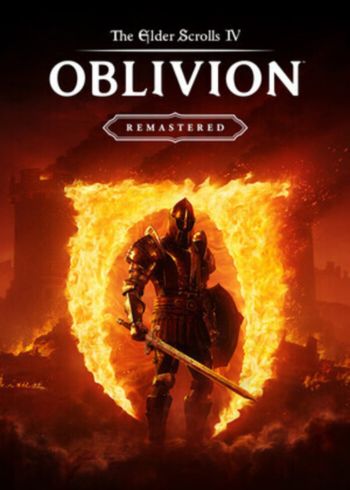
The Elder Scrolls IV Oblivion Remastered

The Elder Scrolls IV Oblivion Remastered

The Elder Scrolls IV Oblivion Remastered Steam Global CD-Key

PLATFORM

PC Steam

REGION

Region Free

GAME INFO

RELEASE DATE:

April 22, 2025

DEVELOPER:

Bethesda Game Studios

PUBLISHER:

Take-Two Interactive

GENRE:

Action, Adventure, RPG

FOR AGES:

TAGS:

GAME INFO

RELEASE DATE:

April 22, 2025

DEVELOPER:

Bethesda Game Studios

PUBLISHER:

Take-Two Interactive

GENRE:

Action, Adventure, RPG

FOR AGES:

TAGS:

  • INFORMATION
  • SYSTEM REQUIREMENTS
  • KEY ACTIVATION

The Elder Scrolls IV: Oblivion™ Remastered brings the 2006 Game of the Year into the modern era with stunning visuals, enhanced performance, and refined gameplay. Explore the vast, open world of Cyrodiil like never before as you battle the forces of Oblivion in one of the most beloved RPGs from the award-winning Bethesda Game Studios. Every corner of Tamriel has been beautifully reimagined, delivering a richer and more immersive experience.


Forge your own path as a warrior, assassin, mage, or anything in between in a world filled with choice and consequence. Master swordplay, unleash powerful magic, and uncover unforgettable quests as you fight to stop a Daedric invasion. Oblivion Remastered includes all original content and expansions—Shivering Isles, Knights of the Nine, and more—for the ultimate fantasy RPG experience.

  •  

Minimum:

Requires a 64-bit processor and operating system
OS: Windows 10 version 21H1 (10.0.19043)
Processor: AMD Ryzen 5 2600X, Intel Core i7-6800K
Memory: 16 GB RAM
Graphics: AMD Radeon RX 5700, NVIDIA GeForce 1070 Ti
DirectX: Version 12
Storage: 125 GB available space
Additional Notes: SSD Required

Recommended:

Requires a 64-bit processor and operating system
OS: Windows 10/11 (with updates)
Processor: AMD Ryzen 5 3600X, Intel Core i5-10600K
Memory: 32 GB RAM
Graphics: AMD Radeon RX 6800XT or NVIDIA RTX 2080
DirectX: Version 12
Storage: 125 GB available space
Additional Notes: SSD Required; Performance scales with better hardware


Activating a CD Key on Steam

Please follow these instructions to activate a new retail purchase on Steam:

1. Launch the Steam client software and log into your Steam account.

2. Click the Games Menu.

3. Choose Activate a Product on Steam...

4. Follow the onscreen instructions to complete the process.

The Elder Scrolls IV Oblivion Remastered Steam Global CD-Key

TYPE

Game

PLATFORM

PC Steam

REGION

Region Free

GAME INFO

RELEASE DATE:

April 22, 2025

DEVELOPER:

Bethesda Game Studios

PUBLISHER:

Take-Two Interactive

GENRE:

Action, Adventure, RPG

FOR AGES:

TAGS:

  • INFORMATION
  • SYSTEM REQUIREMENTS
  • KEY ACTIVATION

The Elder Scrolls IV: Oblivion™ Remastered brings the 2006 Game of the Year into the modern era with stunning visuals, enhanced performance, and refined gameplay. Explore the vast, open world of Cyrodiil like never before as you battle the forces of Oblivion in one of the most beloved RPGs from the award-winning Bethesda Game Studios. Every corner of Tamriel has been beautifully reimagined, delivering a richer and more immersive experience.


Forge your own path as a warrior, assassin, mage, or anything in between in a world filled with choice and consequence. Master swordplay, unleash powerful magic, and uncover unforgettable quests as you fight to stop a Daedric invasion. Oblivion Remastered includes all original content and expansions—Shivering Isles, Knights of the Nine, and more—for the ultimate fantasy RPG experience.

  •  

Minimum:

Requires a 64-bit processor and operating system
OS: Windows 10 version 21H1 (10.0.19043)
Processor: AMD Ryzen 5 2600X, Intel Core i7-6800K
Memory: 16 GB RAM
Graphics: AMD Radeon RX 5700, NVIDIA GeForce 1070 Ti
DirectX: Version 12
Storage: 125 GB available space
Additional Notes: SSD Required

Recommended:

Requires a 64-bit processor and operating system
OS: Windows 10/11 (with updates)
Processor: AMD Ryzen 5 3600X, Intel Core i5-10600K
Memory: 32 GB RAM
Graphics: AMD Radeon RX 6800XT or NVIDIA RTX 2080
DirectX: Version 12
Storage: 125 GB available space
Additional Notes: SSD Required; Performance scales with better hardware
Activating a CD Key on Steam

Please follow these instructions to activate a new retail purchase on Steam:

1. Launch the Steam client software and log into your Steam account.

2. Click the Games Menu.

3. Choose Activate a Product on Steam...

4. Follow the onscreen instructions to complete the process.

  • INFORMATION
  • SYSTEM REQUIREMENTS
  • KEY ACTIVATION

The Elder Scrolls IV: Oblivion™ Remastered brings the 2006 Game of the Year into the modern era with stunning visuals, enhanced performance, and refined gameplay. Explore the vast, open world of Cyrodiil like never before as you battle the forces of Oblivion in one of the most beloved RPGs from the award-winning Bethesda Game Studios. Every corner of Tamriel has been beautifully reimagined, delivering a richer and more immersive experience.


Forge your own path as a warrior, assassin, mage, or anything in between in a world filled with choice and consequence. Master swordplay, unleash powerful magic, and uncover unforgettable quests as you fight to stop a Daedric invasion. Oblivion Remastered includes all original content and expansions—Shivering Isles, Knights of the Nine, and more—for the ultimate fantasy RPG experience.

  •  

Minimum:

Requires a 64-bit processor and operating system
OS: Windows 10 version 21H1 (10.0.19043)
Processor: AMD Ryzen 5 2600X, Intel Core i7-6800K
Memory: 16 GB RAM
Graphics: AMD Radeon RX 5700, NVIDIA GeForce 1070 Ti
DirectX: Version 12
Storage: 125 GB available space
Additional Notes: SSD Required

Recommended:

Requires a 64-bit processor and operating system
OS: Windows 10/11 (with updates)
Processor: AMD Ryzen 5 3600X, Intel Core i5-10600K
Memory: 32 GB RAM
Graphics: AMD Radeon RX 6800XT or NVIDIA RTX 2080
DirectX: Version 12
Storage: 125 GB available space
Additional Notes: SSD Required; Performance scales with better hardware

Activating a CD Key on Steam

Please follow these instructions to activate a new retail purchase on Steam:

1. Launch the Steam client software and log into your Steam account.

2. Click the Games Menu.

3. Choose Activate a Product on Steam...

4. Follow the onscreen instructions to complete the process.

Exclusive Newsletter

Exclusive Newsletter

ANYCDKEY
Logo