
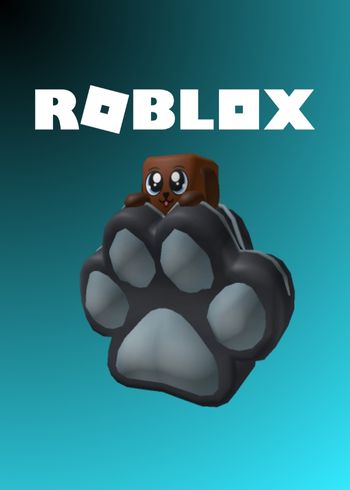
ROBLOX Doggy Backpack DLC (PC/Mac/Android/iOS/XBOX)

ROBLOX Doggy Backpack DLC (PC/Mac/Android/iOS/XBOX)

ROBLOX Doggy Backpack - Mining Simulator 2
Set Lowest Price Alert
×
Notify me, when price drops
Set Alert for Product: Roblox - Doggy Backpack - Mining Simulator 2 DLC CD Key - $1.02

PLATFORM

Official Website

REGION

Region Free

GAME INFO

RELEASE DATE:

August 27, 2017

DEVELOPER:

ROBLOX

PUBLISHER:

Roblox

GENRE:

FOR AGES:

TAGS:

ROBLOX Doggy Backpack - Mining Simulator 2

PLATFORM

Official Website

REGION

Region Free
Set Lowest Price Alert
×
Notify me, when price drops
Set Alert for Product: Roblox - Doggy Backpack - Mining Simulator 2 DLC CD Key - $1.02

GAME INFO

RELEASE DATE:

August 27, 2017

DEVELOPER:

ROBLOX

PUBLISHER:

Roblox

GENRE:

FOR AGES:

TAGS:

  • INFORMATION
  • SYSTEM REQUIREMENTS
  • KEY ACTIVATION

Roblox Doggy Backpack – Mining Simulator 2

The Doggy Backpack is a cosmetic item in Roblox Mining Simulator 2. It is designed to look like the popular in-game dog pet.

In Mining Simulator 2, players explore mines, dig for rare ores, and collect different pets. Backpacks are an important part of the game because they let players carry more items while mining.

The Doggy Backpack does not add special powers, but it is a fun way to customize your character. Many players enjoy collecting themed items like this to show off their style in the game.

Mining Simulator 2 was created by Rumble Studios on Roblox and has millions of plays. The Doggy Backpack is one of many items that fans search for when they want to upgrade their look.

  •  

Activating a CD Key on Steam

Please follow these instructions to activate a new retail purchase on Steam:

1. Launch the Steam client software and log into your Steam account.

2. Click the Games Menu.

3. Choose Activate a Product on Steam...

4. Follow the onscreen instructions to complete the process.

ROBLOX Doggy Backpack - Mining Simulator 2

TYPE

DLC

PLATFORM

Official Website

REGION

Region Free
Set Lowest Price Alert
×
Notify me, when price drops
Set Alert for Product: Roblox - Doggy Backpack - Mining Simulator 2 DLC CD Key - $1.02


GAME INFO

RELEASE DATE:

August 27, 2017

DEVELOPER:

ROBLOX

PUBLISHER:

Roblox

GENRE:

FOR AGES:

TAGS:

  • INFORMATION
  • SYSTEM REQUIREMENTS
  • KEY ACTIVATION

Roblox Doggy Backpack – Mining Simulator 2

The Doggy Backpack is a cosmetic item in Roblox Mining Simulator 2. It is designed to look like the popular in-game dog pet.

In Mining Simulator 2, players explore mines, dig for rare ores, and collect different pets. Backpacks are an important part of the game because they let players carry more items while mining.

The Doggy Backpack does not add special powers, but it is a fun way to customize your character. Many players enjoy collecting themed items like this to show off their style in the game.

Mining Simulator 2 was created by Rumble Studios on Roblox and has millions of plays. The Doggy Backpack is one of many items that fans search for when they want to upgrade their look.

  •  

Activating a CD Key on Steam

Please follow these instructions to activate a new retail purchase on Steam:

1. Launch the Steam client software and log into your Steam account.

2. Click the Games Menu.

3. Choose Activate a Product on Steam...

4. Follow the onscreen instructions to complete the process.

  • INFORMATION
  • SYSTEM REQUIREMENTS
  • KEY ACTIVATION

Roblox Doggy Backpack – Mining Simulator 2

The Doggy Backpack is a cosmetic item in Roblox Mining Simulator 2. It is designed to look like the popular in-game dog pet.

In Mining Simulator 2, players explore mines, dig for rare ores, and collect different pets. Backpacks are an important part of the game because they let players carry more items while mining.

The Doggy Backpack does not add special powers, but it is a fun way to customize your character. Many players enjoy collecting themed items like this to show off their style in the game.

Mining Simulator 2 was created by Rumble Studios on Roblox and has millions of plays. The Doggy Backpack is one of many items that fans search for when they want to upgrade their look.

  •  

Activating a CD Key on Steam

Please follow these instructions to activate a new retail purchase on Steam:

1. Launch the Steam client software and log into your Steam account.

2. Click the Games Menu.

3. Choose Activate a Product on Steam...

4. Follow the onscreen instructions to complete the process.

Exclusive Newsletter

Exclusive Newsletter

ANYCDKEY
Logo