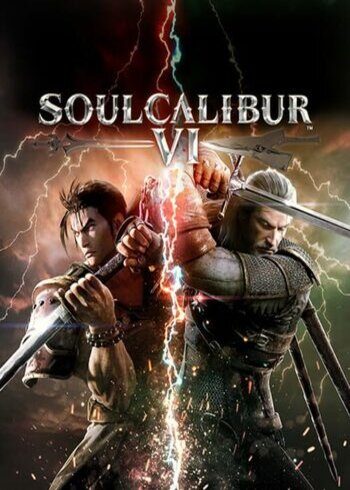

Soulcalibur VI

Soulcalibur VI

Soulcalibur VI

PLATFORM

PC Steam

REGION

Region Free

GAME INFO

RELEASE DATE:

October 19, 2018

DEVELOPER:

Bandai Namco

PUBLISHER:

BANDAI NAMCO Entertainment

GENRE:

Action, Fighting

FOR AGES:

Soulcalibur VI

PLATFORM

PC Steam

REGION

Region Free

GAME INFO

RELEASE DATE:

October 19, 2018

DEVELOPER:

Bandai Namco

PUBLISHER:

BANDAI NAMCO Entertainment

GENRE:

Action, Fighting

FOR AGES:

  • INFORMATION
  • SYSTEM REQUIREMENTS
  • KEY ACTIVATION

Soulcalibur VI

Bring more than your fists to the fight! Featuring all-new battle mechanics and characters, SOULCALIBUR VI marks a new era of the historic franchise. Welcome back to the stage of history!

  •  

MINIMUM:

Requires a 64-bit processor and operating system
OS: Windows 7, 8.1, 10 (64-bit)
Processor: Intel Core i3-4160 @ 3.60GHz or equivalent
Memory: 6 GB RAM
Graphics: NVIDIA GeForce GTX 1050
DirectX: Version 11
Storage: 20 GB available space
Sound Card: DirectX compatible soundcard or onboard chipset


RECOMMENDED:

Requires a 64-bit processor and operating system
OS: Windows 7, 8.1, 10 (64-bit)
Processor: Intel Core i5-4690 3.5 GHz or equivalent
Memory: 8 GB RAM
Graphics: GeForce GTX 1060 or equivalent
DirectX: Version 11
Storage: 20 GB available space
Sound Card: DirectX compatible soundcard or onboard chipset

Activating a CD Key on Steam

Please follow these instructions to activate a new retail purchase on Steam:

1. Launch the Steam client software and log into your Steam account.

2. Click the Games Menu.

3. Choose Activate a Product on Steam...

4. Follow the onscreen instructions to complete the process.

Soulcalibur VI

TYPE

Game

PLATFORM

PC Steam

REGION

Region Free

GAME INFO

RELEASE DATE:

October 19, 2018

DEVELOPER:

Bandai Namco

PUBLISHER:

BANDAI NAMCO Entertainment

GENRE:

Action, Fighting

FOR AGES:

  • INFORMATION
  • SYSTEM REQUIREMENTS
  • KEY ACTIVATION

Soulcalibur VI

Bring more than your fists to the fight! Featuring all-new battle mechanics and characters, SOULCALIBUR VI marks a new era of the historic franchise. Welcome back to the stage of history!

  •  

MINIMUM:

Requires a 64-bit processor and operating system
OS: Windows 7, 8.1, 10 (64-bit)
Processor: Intel Core i3-4160 @ 3.60GHz or equivalent
Memory: 6 GB RAM
Graphics: NVIDIA GeForce GTX 1050
DirectX: Version 11
Storage: 20 GB available space
Sound Card: DirectX compatible soundcard or onboard chipset


RECOMMENDED:

Requires a 64-bit processor and operating system
OS: Windows 7, 8.1, 10 (64-bit)
Processor: Intel Core i5-4690 3.5 GHz or equivalent
Memory: 8 GB RAM
Graphics: GeForce GTX 1060 or equivalent
DirectX: Version 11
Storage: 20 GB available space
Sound Card: DirectX compatible soundcard or onboard chipset

Activating a CD Key on Steam

Please follow these instructions to activate a new retail purchase on Steam:

1. Launch the Steam client software and log into your Steam account.

2. Click the Games Menu.

3. Choose Activate a Product on Steam...

4. Follow the onscreen instructions to complete the process.

  • INFORMATION
  • SYSTEM REQUIREMENTS
  • KEY ACTIVATION

Soulcalibur VI

Bring more than your fists to the fight! Featuring all-new battle mechanics and characters, SOULCALIBUR VI marks a new era of the historic franchise. Welcome back to the stage of history!

  •  

MINIMUM:

Requires a 64-bit processor and operating system
OS: Windows 7, 8.1, 10 (64-bit)
Processor: Intel Core i3-4160 @ 3.60GHz or equivalent
Memory: 6 GB RAM
Graphics: NVIDIA GeForce GTX 1050
DirectX: Version 11
Storage: 20 GB available space
Sound Card: DirectX compatible soundcard or onboard chipset


RECOMMENDED:

Requires a 64-bit processor and operating system
OS: Windows 7, 8.1, 10 (64-bit)
Processor: Intel Core i5-4690 3.5 GHz or equivalent
Memory: 8 GB RAM
Graphics: GeForce GTX 1060 or equivalent
DirectX: Version 11
Storage: 20 GB available space
Sound Card: DirectX compatible soundcard or onboard chipset

Activating a CD Key on Steam

Please follow these instructions to activate a new retail purchase on Steam:

1. Launch the Steam client software and log into your Steam account.

2. Click the Games Menu.

3. Choose Activate a Product on Steam...

4. Follow the onscreen instructions to complete the process.

Exclusive Newsletter

Exclusive Newsletter

ANYCDKEY
Logo