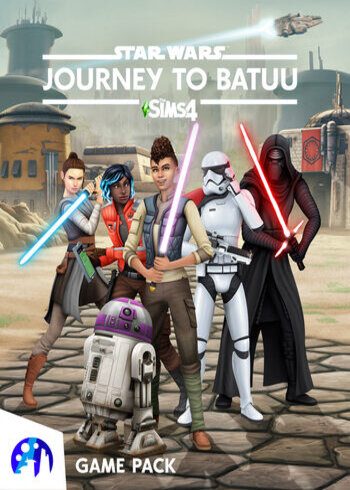

The Sims 4: Star Wars Journey to Batuu DLC

The Sims 4: Star Wars Journey to Batuu DLC

The Sims 4 Star Wars - Journey to Batuu DLC PC EA Origin Game Digital Cover Card

PLATFORM

EA App

REGION

Region Free

GAME INFO

RELEASE DATE:

September 8, 2020

DEVELOPER:

EA Maxis

PUBLISHER:

Electronic Arts Inc.

GENRE:

Simulation

FOR AGES:

GAME INFO

RELEASE DATE:

September 8, 2020

DEVELOPER:

EA Maxis

PUBLISHER:

Electronic Arts Inc.

GENRE:

Simulation

FOR AGES:

  • INFORMATION
  • SYSTEM REQUIREMENTS
  • KEY ACTIVATION

The Sims 4: Star Wars Journey to Batuu DLC Origin Description


Create your Sim’s unique Star Wars story as you explore the remote world of Batuu, from Galaxy’s Edge at Disneyland and Disney World, in The Sims 4 Star Wars: Journey to Batuu Game Pack. Will your Sim join up with the Resistance, fall in with the scoundrels, or enlist with the First Order? It’s up to you! Build up your Sim’s reputation to unlock missions, purchase a lightsaber or droid, and meet iconic Star Wars characters like Rey and Kylo Ren.


Experience the Edge of the Galaxy

Your Sims are definitely not at home anymore. From the Millennium Falcon to the bustling cantina and unique attire of Batuu, Sims will be surrounded by the iconic sights and sounds of Star Wars. When your Sim returns home, bring back new decor and recipes inspired by your travels, play a game of sabacc, or host a playful lightsaber training session.


Create Your Star Wars Story

The Resistance, First Order, and scoundrels are fighting to control Batuu, but your Sims’ actions determine who will succeed. As Sims undertake challenges and special missions, you’ll tip the balance of power. Unlock rewards like starfighter access, new outfits, and critical missions on Batuu. And who knows? Maybe you’ll find your Batuuan special someone!


Unite with Iconic Characters

Completing missions earns your Sim reputation points, and as you rack them up, you get closer to meeting the leaders of the forces on Batuu. Possibilities shift depending on your Sim’s actions—will you choose to support Kylo Ren in his efforts to uncover the Resistance base or join Rey and Vi Moradi in the fight against the First Order? Whichever path your Sim chooses, Hondo Ohnaka and his scoundrels are always there if you need a few extra galactic credits.


Get Your Own Lightsaber and Droid

Explore Batuu to find parts for the most coveted Star Wars artifact: a lightsaber. Collect every piece to construct a blade that’s all your own. Then invite other Sims to spar in lightsaber challenges! Or visit the Droid Depot and purchase your very own droid to help on your adventures… and maybe zap a few Sims. You can even bring your droid friend home with you so you always have that plus-one for parties!

  •  

Minimum system requirements

  • System requirements: Windows XP (SP3) / Vista (SP2) / 7 (SP1) / 8 / 8.1 / 10
  • Processor: 1.8 GHz Intel Core 2 Duo, AMD Athlon 64 Dual-Core 4000+ ( 2.0 GHz Intel Core 2 Duo, 2.0 GHz AMD Turion 64 X2 TL-62)
  • Memory: 2 GB RAM
  • Graphics: 128 MB Pixel Shader 3.0. NVIDIA GeForce 6600, ATI Radeon X1300, Intel GMA X4500
  • Storage: 9 GB 1 GB additional custom content saved games
  • Additional Notes: Internet connection required for product activation


Recommended system requirements

  • System requirements: 64 Bit Windows 7 / 8 / 8.1 /10
  • Processor: Intel core i5, AMD Athlon X4
  • Memory: 4 GB RAM
  • Graphics: NVIDIA GTX 650

Activating a CD Key on Steam

Please follow these instructions to activate a new retail purchase on Steam:

1. Launch the Steam client software and log into your Steam account.

2. Click the Games Menu.

3. Choose Activate a Product on Steam...

4. Follow the onscreen instructions to complete the process.

The Sims 4 Star Wars - Journey to Batuu DLC PC EA Origin Game Digital Cover Card

TYPE

DLC

PLATFORM

EA App

REGION

Region Free

GAME INFO

RELEASE DATE:

September 8, 2020

DEVELOPER:

EA Maxis

PUBLISHER:

Electronic Arts Inc.

GENRE:

Simulation

FOR AGES:

  • INFORMATION
  • SYSTEM REQUIREMENTS
  • KEY ACTIVATION

The Sims 4: Star Wars Journey to Batuu DLC Origin Description


Create your Sim’s unique Star Wars story as you explore the remote world of Batuu, from Galaxy’s Edge at Disneyland and Disney World, in The Sims 4 Star Wars: Journey to Batuu Game Pack. Will your Sim join up with the Resistance, fall in with the scoundrels, or enlist with the First Order? It’s up to you! Build up your Sim’s reputation to unlock missions, purchase a lightsaber or droid, and meet iconic Star Wars characters like Rey and Kylo Ren.


Experience the Edge of the Galaxy

Your Sims are definitely not at home anymore. From the Millennium Falcon to the bustling cantina and unique attire of Batuu, Sims will be surrounded by the iconic sights and sounds of Star Wars. When your Sim returns home, bring back new decor and recipes inspired by your travels, play a game of sabacc, or host a playful lightsaber training session.


Create Your Star Wars Story

The Resistance, First Order, and scoundrels are fighting to control Batuu, but your Sims’ actions determine who will succeed. As Sims undertake challenges and special missions, you’ll tip the balance of power. Unlock rewards like starfighter access, new outfits, and critical missions on Batuu. And who knows? Maybe you’ll find your Batuuan special someone!


Unite with Iconic Characters

Completing missions earns your Sim reputation points, and as you rack them up, you get closer to meeting the leaders of the forces on Batuu. Possibilities shift depending on your Sim’s actions—will you choose to support Kylo Ren in his efforts to uncover the Resistance base or join Rey and Vi Moradi in the fight against the First Order? Whichever path your Sim chooses, Hondo Ohnaka and his scoundrels are always there if you need a few extra galactic credits.


Get Your Own Lightsaber and Droid

Explore Batuu to find parts for the most coveted Star Wars artifact: a lightsaber. Collect every piece to construct a blade that’s all your own. Then invite other Sims to spar in lightsaber challenges! Or visit the Droid Depot and purchase your very own droid to help on your adventures… and maybe zap a few Sims. You can even bring your droid friend home with you so you always have that plus-one for parties!

  •  

Minimum system requirements

  • System requirements: Windows XP (SP3) / Vista (SP2) / 7 (SP1) / 8 / 8.1 / 10
  • Processor: 1.8 GHz Intel Core 2 Duo, AMD Athlon 64 Dual-Core 4000+ ( 2.0 GHz Intel Core 2 Duo, 2.0 GHz AMD Turion 64 X2 TL-62)
  • Memory: 2 GB RAM
  • Graphics: 128 MB Pixel Shader 3.0. NVIDIA GeForce 6600, ATI Radeon X1300, Intel GMA X4500
  • Storage: 9 GB 1 GB additional custom content saved games
  • Additional Notes: Internet connection required for product activation


Recommended system requirements

  • System requirements: 64 Bit Windows 7 / 8 / 8.1 /10
  • Processor: Intel core i5, AMD Athlon X4
  • Memory: 4 GB RAM
  • Graphics: NVIDIA GTX 650

Activating a CD Key on Steam

Please follow these instructions to activate a new retail purchase on Steam:

1. Launch the Steam client software and log into your Steam account.

2. Click the Games Menu.

3. Choose Activate a Product on Steam...

4. Follow the onscreen instructions to complete the process.

  • INFORMATION
  • SYSTEM REQUIREMENTS
  • KEY ACTIVATION

The Sims 4: Star Wars Journey to Batuu DLC Origin Description


Create your Sim’s unique Star Wars story as you explore the remote world of Batuu, from Galaxy’s Edge at Disneyland and Disney World, in The Sims 4 Star Wars: Journey to Batuu Game Pack. Will your Sim join up with the Resistance, fall in with the scoundrels, or enlist with the First Order? It’s up to you! Build up your Sim’s reputation to unlock missions, purchase a lightsaber or droid, and meet iconic Star Wars characters like Rey and Kylo Ren.


Experience the Edge of the Galaxy

Your Sims are definitely not at home anymore. From the Millennium Falcon to the bustling cantina and unique attire of Batuu, Sims will be surrounded by the iconic sights and sounds of Star Wars. When your Sim returns home, bring back new decor and recipes inspired by your travels, play a game of sabacc, or host a playful lightsaber training session.


Create Your Star Wars Story

The Resistance, First Order, and scoundrels are fighting to control Batuu, but your Sims’ actions determine who will succeed. As Sims undertake challenges and special missions, you’ll tip the balance of power. Unlock rewards like starfighter access, new outfits, and critical missions on Batuu. And who knows? Maybe you’ll find your Batuuan special someone!


Unite with Iconic Characters

Completing missions earns your Sim reputation points, and as you rack them up, you get closer to meeting the leaders of the forces on Batuu. Possibilities shift depending on your Sim’s actions—will you choose to support Kylo Ren in his efforts to uncover the Resistance base or join Rey and Vi Moradi in the fight against the First Order? Whichever path your Sim chooses, Hondo Ohnaka and his scoundrels are always there if you need a few extra galactic credits.


Get Your Own Lightsaber and Droid

Explore Batuu to find parts for the most coveted Star Wars artifact: a lightsaber. Collect every piece to construct a blade that’s all your own. Then invite other Sims to spar in lightsaber challenges! Or visit the Droid Depot and purchase your very own droid to help on your adventures… and maybe zap a few Sims. You can even bring your droid friend home with you so you always have that plus-one for parties!

  •  

Minimum system requirements

  • System requirements: Windows XP (SP3) / Vista (SP2) / 7 (SP1) / 8 / 8.1 / 10
  • Processor: 1.8 GHz Intel Core 2 Duo, AMD Athlon 64 Dual-Core 4000+ ( 2.0 GHz Intel Core 2 Duo, 2.0 GHz AMD Turion 64 X2 TL-62)
  • Memory: 2 GB RAM
  • Graphics: 128 MB Pixel Shader 3.0. NVIDIA GeForce 6600, ATI Radeon X1300, Intel GMA X4500
  • Storage: 9 GB 1 GB additional custom content saved games
  • Additional Notes: Internet connection required for product activation


Recommended system requirements

  • System requirements: 64 Bit Windows 7 / 8 / 8.1 /10
  • Processor: Intel core i5, AMD Athlon X4
  • Memory: 4 GB RAM
  • Graphics: NVIDIA GTX 650

Activating a CD Key on Steam

Please follow these instructions to activate a new retail purchase on Steam:

1. Launch the Steam client software and log into your Steam account.

2. Click the Games Menu.

3. Choose Activate a Product on Steam...

4. Follow the onscreen instructions to complete the process.

Exclusive Newsletter

Exclusive Newsletter

ANYCDKEY
Logo